
Ohmega
Normalize audio loudness directly in your files — no tags, no player config, every player gets it right.
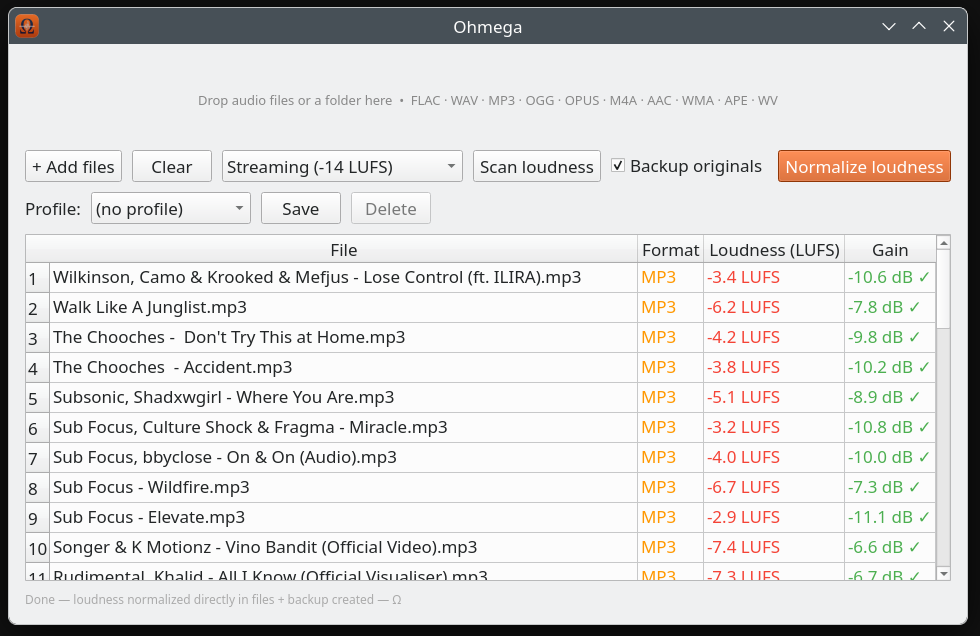
Normalize audio loudness directly in your files — no tags, no player config, every player gets it right.
Measures and applies gain using industry-standard LUFS metering. Presets for Streaming (−14), ReplayGain (−18), and Broadcast/Film (−23) — or dial in any custom LUFS target.
Treat each folder as an album: one shared gain is measured across all its tracks, so the loudness balance between songs stays intact — quiet intros stay quiet, loud drops stay loud. Handles many folders at once.
FLAC, WAV, AIFF, APE and WavPack are re-encoded without any quality loss. Lossy formats are re-encoded at highest quality.
Drop files or entire folders. Ohmega processes everything recursively and shows loudness per file before you commit.
Originals are copied to an "Ohmega Backup" subfolder before any changes are made. One checkbox, always on by default.
Unlike ReplayGain tags, the gain is written directly into the audio data — every player, every device, correct volume.
Built with PyQt6, runs natively on any Linux desktop. Available as a Flatpak with no system dependencies needed.
Save your target and backup settings as named profiles. Switch between them instantly — perfect for different workflows or output requirements.
Prefer the terminal? ohmega-cli shares the same engine with full parity — targets, album mode, recursive folders, backups and a dry-run preview. Perfect for scripts and batch jobs.
Lossless — re-encoded without quality loss
Lossy — re-encoded at highest quality
flatpak install --user ohmega.flatpak
flatpak run io.github.Daniel_v8.Ohmega
Requires Flatpak and the KDE Platform 6.9 runtime. Works on Fedora, Ubuntu, Arch and any Linux distro.
Prefer the terminal? ohmega-cli shares the same engine as the app — only Python and ffmpeg required. Folders are scanned recursively and originals are backed up before any change.
ohmega-cli track1.flac track2.mp3
ohmega-cli -t broadcast ~/Music
ohmega-cli --album ~/Music/Album1 ~/Music/Album2
ohmega-cli --dry-run ~/Music
ohmega-cli --help
The ohmega-cli command ships with the Fedora (COPR) and Arch (AUR) packages. Inside the Flatpak, run it as
flatpak run --command=ohmega-cli io.github.Daniel_v8.Ohmega --help.